RV Keyless Door Lock Not Working? A Troubleshooting Decision Tree
RV keyless door lock not working? Start with a symptom tree: dead lock, unresponsive keypad, fob not pairing, or a latch that won't throw — plus when to stop and call a locksmith.

When an RV door lock stops working at camp or in your driveway, guessing at fixes wastes time and can turn a minor battery or alignment issue into a damaged latch. Because RV entry locks sit exposed to sun, rain, road dust, and highway vibration, electronics and mechanical linkages fail in very different ways.
Match what your lock is doing right now to the symptom tree below. If you are standing outside a locked rig, start with the immediate entry section first, then jump straight to your matching branch.
Start Here: Is Your Lock Dead, or Just Not Unlocking?

Every branch below assumes you have first checked whether your mechanical backup key opens the door (covered in the next section). Pick the symptom that matches your lock:
Branch A — No Lights, No Beeps, No Motor Sound
You press the keypad or fob and nothing happens—no backlight, no beep, and no motor click. Go to Branch A: Nothing Happens — Power and Batteries.
Branch B — Lights Up or Beeps, but the Door Stays Locked
The keypad illuminates and beeps when you enter digits, yet the door stays locked or your PIN is rejected. Go to Branch B: It Lights Up but Won't Unlock — Codes and Keypad Behavior.
Branch E — The Remote Fob Does Nothing at All
The keypad and mechanical key work normally, but pressing your remote fob produces no response. Go to Branch E: The Fob Does Nothing.
Mechanical Branch — Handle Turns Without Moving the Latch, or Key Won't Turn
The paddle handle moves freely without retracting the latch, the deadbolt binds against the frame, or your physical key sticks in the cylinder. Go to Mechanical Branch: Handle Turns, or the Key Won't Turn.
Getting Back In Right Now: Mechanical Key and the Emergency Power Port
If you are locked out right now, get inside safely before troubleshooting electronics or strike alignment.
The Mechanical Key Is Your First Backup
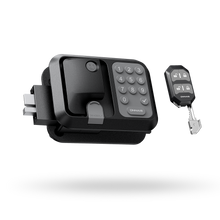
Every ONNAIS RV lock includes mechanical backup keys so you have a non-electronic way in when batteries run down or a code fails. Flip open the keyhole cover, insert the mechanical key, and turn to unlock. Once inside, press the silicone cover closed when not in use so dust and rain stay out.
The Emergency Power Port — Where It Exists and Where It Doesn't
If the internal AA batteries are depleted and you do not have your mechanical key, check whether your model includes an exterior emergency power port:
| ONNAIS Model | Library Status | Documented Behavior |
|---|---|---|
| Guard Smart (W008) | Documented | Supplies temporary power when internal batteries are depleted and no key is available; emergency use only, does not charge |
| Guard Neo | Documented | Covered emergency access point supplies temporary power for emergency access only and does not recharge batteries |
| Guard Pro (W007B) | Not listed in library documentation | Check your model's Quick Start Guide; use the mechanical backup key |
| Guard SE (W007) | Not listed in library documentation | Check your model's Quick Start Guide; use the mechanical backup key |
After using the port on Guard Smart (W008) or Guard Neo, close the silicone cover and replace the four AA batteries right away.
What Not to Do When Locked Out
Never pry the keypad housing, drill the cylinder, or hammer the handle. Forcing hardware bends linkages and warps the door frame—if neither the mechanical key nor an emergency power port gets you in, skip to When to Stop and Call a Locksmith, or review five clear signs your RV lock needs replacing.
Branch A: Nothing Happens — Power and Batteries

When an electronic RV lock shows no keypad light, no beep, and no motor sound, treat it as a power issue first.
Two Separate Power Systems, and Only One of Them Is the Lock
A keyless RV lock uses independent power sources that fail separately:
- The lock body: Across the ONNAIS Guard lineup—Guard SE, Guard Pro, Guard Smart (W008), and Guard Neo—the lock body runs on four AA 1.5V batteries (not included).
- The remote fob: Each fob runs on its own internal cell, separate from the four AA batteries in the handle. A dead fob cell never turns off keypad lights, and dead AA cells in the door stop the motor even when your fob cell is fresh.
- The emergency power port (Guard Smart and Guard Neo): This exterior port is a temporary power input, not an internal battery or charger—the lock goes dark again once unplugged until fresh AA cells are installed.
Replace Batteries Without Losing Your Code or Fob Pairings
Changing the batteries does not affect the current code or paired remote settings. Remove the interior battery cover screw, install four new AA alkaline batteries from the same brand, and avoid rechargeable batteries—rechargeable cells are not advised because they can lead to unstable voltage and affect performance. Watch for your lock's low-battery indicator, and remember that freezing weather can make cold alkaline cells act dead until warmed. For the full swap procedure, cold-weather care, and low-battery warnings, see our full keyless RV lock battery checklist.
If It Is Still Dead After a Battery Change
If four fresh AA alkaline cells are installed with matching polarity and the lock still does not respond, check three things with the door open:
- Interior Child Lock switch: Confirm the interior switch has not been slid into a position that disables exterior controls.
- Reset status and Bluetooth: If someone triggered a factory reset, previous codes and fobs were cleared and must be set up again; on Guard Smart, confirm phone Bluetooth is on for app unlock.
- Open-door bolt test: Cycle the lock with the door open to see whether the motor runs free of frame friction.
Branch B: It Lights Up but Won't Unlock — Codes and Keypad Behavior
When the keypad lights up and beeps as you press digits, the board has enough voltage to power its LEDs—so the fault is mechanical binding on the bolt, a voltage drop under motor load, or a code/reset issue.
Rule Out the Obvious Before Changing Settings
- Check whether the internal deadbolt is engaged: ONNAIS Guard locks integrate an internal deadbolt behind a single visible latch tongue. The deadbolt must retract before the main latch releases.
- Relieve door-frame pressure: RV doors shift during travel and expand in sun, pressing the latch against the strike plate. Pull or push the door gently toward the frame while entering your code.
- Test for weak batteries mimicking a code error: LEDs draw tiny current compared to the motor. If the keypad lights up and beeps but stalls when the motor turns, replace all four AA alkaline cells first.
Resetting a Code When You Have Lost Yours
If the door is open and the keypad rejects your PIN—or you need to clear the factory setup and program a new password—follow the procedure for your model:
- Guard Pro and Guard SE: Press the interior Reset button three times continuously to clear the default password before adding a new one, then follow the "Add digital password" section on Page 3 of the Quick Start Guide.
- Guard Smart (W008): Manage passwords, one-time codes (up to 10 one-time passwords), and user access in the ONNAIS app over Bluetooth.
- Guard Neo: Follow the password setup sequence in the Guard Neo Quick Start Guide (5-to-15-digit password length).
(Always replace the factory code on setup day and test your new code with the door open before latching it shut.)
Anti-Peeping Entry and Why a Valid Code May Look Rejected
Guard SE, Guard Pro, Guard Smart, and Guard Neo support anti-peeping virtual passwords: you can enter random digits before or after your real 5-to-15-digit code, up to 32 digits in a single sequence. Press each button deliberately so every digit registers and keep the total string within 32 digits. If the assembly is worn out, see the complete RV lock replacement guide.
Branch E: The Fob Does Nothing
When the keypad unlocks the door cleanly but the remote fob does nothing, your lock motor and four AA batteries are fine—the issue is fob power, pairing, or compatibility.
Check the Fob's Own Power First
The remote fob runs on its own internal cell, separate from the lock's four AA batteries. If you have a second paired fob, test it first; if the second fob works, replace the cell in the non-working remote.
Check That the Fob Is Paired and Compatible with Your Lock
A replacement fob will not operate the lock until paired:
- Pairing capacity: Guard Neo supports up to six paired remote fobs.
- Dual-door control on Guard Pro: The Guard Pro dual-door fob controls front and rear doors from one remote, but requires two main lock units installed.
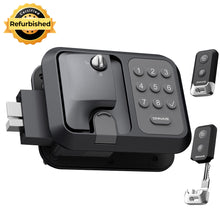
- Model compatibility: In the product library, the Guard Series replacement key fob is documented as compatible with Guard SE, Guard Smart, and Guard Pro. Compatibility with Guard Neo is not listed in the library documentation—verify your exact model before ordering.
The Key-Code Trap on Replacement Fobs
Some replacement fobs require your key code in the format H2025-XX-XXX, printed on the back of the original remote or inside the lock's battery compartment. Record that code in your phone while the door is open.
Range and Interference
ONNAIS Guard Series fobs are documented at over 100 feet, working through camp obstacles. If range drops to a few inches, replace the fob's internal cell first.
When to Stop and Call a Locksmith
DIY troubleshooting has a clear safety boundary. Stop and call a qualified mobile locksmith—or plan a full hardware swap—when you hit any of these four conditions:
- The mechanical key will not turn the cylinder either: If gentle wiggling and dry lubricant do not free the keyway, the tumblers or cam have failed mechanically, and forcing the key will snap the blade inside the plug.
- The latch or deadbolt will not retract with the door open: When the door is wide open (free of strike friction) and turning the handle or knob still fails to move the bolt, an internal spring or link is likely broken—requiring a replacement lock assembly.
- The door frame or strike plate is bent: If the frame cannot close far enough for the latch to reach the keeper, forcing the lock will not secure the door.
- The lock body stays dead after fresh AA alkaline cells and a verified reset: Persistent electronic failure points to a replacement unit; see five clear signs your RV lock needs replacing.
Mechanical Branch: Handle Turns, or the Key Won't Turn
Not every RV lock failure is electronic. Highway vibration, dust, and temperature swings regularly cause mechanical binding in the latch or key cylinder.
Handle Turns, but the Latch Doesn't Move
- Symptoms: The handle turns, but the latch tongue does not retract; the deadbolt refuses to engage or release; or the cylinder spins freely without catching.
- Possible causes: Dirt and debris inside the mechanism, latch misalignment from travel shifting, worn internal springs or tumblers, or low battery power mimicking a mechanical stall on a keyless lock.
-
Step-by-step fix:
- Inspect and clean with dry lubricant: Spray a non-greasy lock lubricant (graphite or dry Teflon spray) into the keyhole and moving parts. Avoid heavy oils like WD-40, as they attract dust over time.
- Check strike-plate alignment: Close the door slowly and watch how the latch meets the strike plate. If misaligned, loosen the strike-plate screws and reposition it.
- Test with the door open: Turn the handle and cycle the deadbolt with the door open. If the latch still does not move, an internal spring may be broken—requiring a replacement assembly.
(For inner screen-door latches, see our guide to RV screen door latch replacement.)
Key Stuck in the Lock or Won't Complete Its Turn
- Symptoms: The key turns partway, resists insertion or removal, or bends while turning.
- Possible causes: Debris or corrosion in the keyway, a worn key that no longer matches the tumblers, temperature expansion or contraction, or a misaligned latch pressing on the cylinder.
-
Step-by-step fix:
- Do not force it: Excessive force risks breaking the key inside the cylinder.
- Lubricate the keyway: Spray a dry lubricant into the keyhole, insert the key, and gently wiggle it to spread the lubricant.
- Check the key against a spare: Compare the sticking key to a spare. If the teeth look worn, use the spare key and replace the worn one.
- Relieve frame pressure: Gently push or pull the door while turning the key to take frame pressure off the latch.
- If the key breaks: Use needle-nose pliers or a key-extractor tool to remove it—avoid makeshift tools.
Preventive Maintenance to Prevent the Next Lockout
A few minutes of routine care prevents most roadside lockouts:
- Lubricate quarterly: Apply a dry lock lubricant (graphite or dry Teflon spray) to the keyway and latch every three months.
- Check alignment after long trips: Verify how the door latch meets the strike plate after highway travel.
- Keep spares outside the rig: Carry at least one spare mechanical key in a separate, safe place, and keep the keyhole's silicone cover closed.
- Protect against weather: Use lock covers or close protective shields in heavy rain or snow.
- Replace batteries annually: For keyless locks, install four fresh AA 1.5V alkaline cells from the same brand once a year, even if they are not dead yet.
Frequently Asked Questions
1. How do I reset a code on my ONNAIS RV lock?
On Guard Pro and Guard SE, press the interior Reset button three times continuously to clear the default password before adding a new one, following the "Add digital password" steps on Page 3 of the Quick Start Guide. On Guard Smart (W008), manage passwords in the ONNAIS app. See keyless versus traditional RV locks for a broader comparison.
2. How do I program or replace a key fob that stopped working?
Replace the fob's own internal battery cell first, then follow your model's Quick Start Guide to pair the remote to the lock body (Guard Neo supports up to six paired fobs). Some replacement fobs require your key code in the format H2025-XX-XXX, printed on the back of the original remote or inside the lock's battery compartment.
3. Will changing the batteries delete my reset code or fob pairings?
No. Changing the four AA batteries does not affect your current keypad code or paired remote fob settings. Only performing a factory reset clears stored credentials.
4. Does my ONNAIS RV lock have an emergency power port?
Guard Smart (W008) and Guard Neo include an exterior emergency power port that supplies temporary power when internal batteries are depleted (for emergency access only; it does not recharge batteries). For Guard Pro and Guard SE, an emergency power port is not listed in the product library documentation—check your Quick Start Guide and keep your mechanical key accessible.
5. Why did my RV lock stop working right after I changed the batteries?
With the door open, confirm all four fresh AA 1.5V alkaline batteries match the + and - polarity markings, check that the interior Child Lock switch is not set to Lock, and verify whether someone pressed the Reset button during the swap.
6. When should I stop troubleshooting and call a locksmith or replace the lock?
Call a locksmith when the mechanical backup key will not turn the cylinder even after dry lubrication and relieving door pressure, or when the latch/deadbolt will not move with the door open. If upgrading makes more sense, browse ONNAIS RV door locks to compare current models.