RV Storage Security Checklist: Locks, Batteries, Cameras & Insurance
Use an RV storage security checklist for locks, batteries, cameras, inspections, facility questions, and insurance records. Prepare your rig today.

RV storage security is an unattended-time problem. Your rig may sit for days or months while batteries age, accounts expire, weather moves in, and nobody notices a damaged latch. A dependable plan combines your own locks and records with the storage facility's controls, a power and camera plan, and an inspection schedule.
Use the checklist below before you close the gate. It is a theft-deterrence and documentation routine, not a guarantee that an RV cannot be stolen.
Print-ready checklist
Use this accessible checklist on screen, then print or save a copy with your private records.
| Task | Before lock-up | 30-day check | 90-day check | Owner or facility | Done |
|---|---|---|---|---|---|
| Main entry and screen door latch tested | Owner | [ ] | |||
| Exterior compartments and cab doors locked | Owner | [ ] | |||
| Hitch, coupler, wheel, or tire device checked | Owner | [ ] | |||
| Windows and emergency exits clear | Owner | [ ] | |||
| Battery and shore-power plan confirmed | Owner | [ ] | |||
| Camera, tracker, network, and subscription checked | Owner/facility | [ ] | |||
| Inventory photos, receipts, and serial records updated | Owner | [ ] | |||
| Gate, lighting, perimeter, and visitor policy confirmed | Facility | [ ] | |||
| Insurance limits, deductible, and storage conditions checked | Insurer | [ ] | |||
| Emergency contact and incident process saved | Owner/facility | [ ] | |||
| Moisture, tires, pests, and visible damage inspected | Owner/facility | [ ] |
Keep critical instructions in the page itself. A PDF is handy in the glove box; it should not be the only place the reader can find the actions.
Before you park: choose the storage controls
Separate what you control from what the facility controls. This avoids the common mistake of assuming a camera at the gate protects an unlocked baggage door on the far side of the lot.
Ask the facility
- What are the gate hours and after-hours entry rules?
- Does each renter receive an individual code or key?
- Where are cameras aimed, and how long is footage retained?
- What lighting, perimeter, patrol, or access logging is actually provided?
- May you use a wheel lock, hitch lock, cover, camera, or shore-power connection?
- Who can move, tow, wash, repair, or enter the RV?
- Who receives an incident report after hours?
- What insurance coverage does the contract require?
A website photograph is not proof of current coverage. Ask for the rule in the storage agreement or by email and keep the answer with your records.
Decide what you control
Your choices usually include the main entry lock, screen and compartment locks, hitch or wheel device, battery settings, camera and tracker accounts, inventory, and inspection cadence. Choose controls that work together. A tracker that loses power when you disconnect the battery is not a complete plan. A smart lock that cannot fit your door is an expensive paperweight.
For broader physical-security concepts, the CISA physical security resources are a useful starting point. They reinforce a basic idea: security is layered. Access control, detection, records, and response cover different parts of the risk.
Lock and anchor every access point
Use a threat-to-control pass rather than buying one dramatic device.
| Access point | What to check | What the control can and cannot do |
|---|---|---|
| Main entry | Deadbolt throws fully; door closes without force | Slows unauthorized entry; does not immobilize the RV |
| Screen door | Latch catches and does not bind | Keeps the screen panel closed; it is not the main entry lock |
| Baggage bays | Every compartment closes; keys are accounted for | Reduces casual access; does not make a thin panel impenetrable |
| Cab doors and windows | Latches engage; keys are removed | Adds a layer; follow the vehicle manual |
| Hitch or coupler | Correct device for the trailer and facility rules | Discourages an easy tow-away; does not replace a wheel or tire plan |
| Wheel or tire | Device fits and can be inspected | Makes movement harder; do not install anything that damages the wheel or blocks service access |
| Generator and propane compartment | Locks and vents remain usable | Protects access while keeping required ventilation and service paths clear |
| Outdoor gear | Bikes, tools, and chairs removed or secured | Reduces grab-and-go loss; does not guarantee recovery |
Keep a controlled mechanical backup key. Do not leave it under a tire or taped inside a compartment. If the facility needs access, document who is authorized and how entry is recorded.
Optional ONNAIS keyless entry for return access
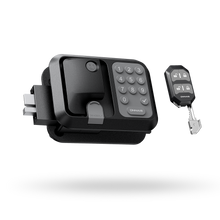
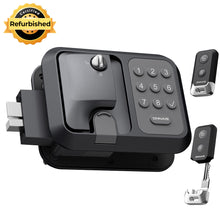
When you are dealing with the main RV entry lock, ONNAIS Guard Smart gives owners four ways to unlock: the ONNAIS app over Bluetooth, a keypad password, a remote key fob, and a mechanical key. It includes an internal deadbolt, a temporary emergency-power port, and a weather-resistant exterior. It uses four AA 1.5V batteries, not included. In the app, you can check battery level, manage fobs, review operation history, share access with registered users, and create up to 10 one-time passwords.

That combination is useful when an authorized adult returns to a stored RV and does not want to hunt for an old key. It does not provide internet remote control, GPS tracking, or facility surveillance. The app is Bluetooth-based, so off-site access requires the connection and account behavior described in the current manual. Keep the mechanical backup controlled and verify that the facility permits owner-installed hardware.
Fit comes first. Guard Smart requires a 3.75-inch-high by 2.75-inch-wide cutout, a 1.25 to 1.5-inch door, a 1.5-inch latch-opening distance, and compatible right-hinged geometry. The current product information excludes Class A RVs, Class C two-pin types, and left-hinged doors. We do not describe it as universal, fully waterproof, theft-proof, or a substitute for facility controls and insurance. Read the RV door locks guide and check whether an RV door lock will fit before you order.
Batteries, shore power, and cameras: plan for failure
Write down what each system needs to work locally and remotely.
| Event | Affected system | What may still work | Owner action |
|---|---|---|---|
| Battery disconnect switched off | Alarm, tracker, smart lock, interior systems | Mechanical lock or local device may remain available | Record the switch position and test the devices you expect to use |
| Dead AA batteries | Door lock or alarm | Mechanical key or emergency power, if the exact model supports it | Test the backup before storage and keep the key controlled |
| Shore-power loss | Charger, hub, camera, refrigerator, dehumidifier | Battery-backed devices may continue briefly | Ask the facility how outages are reported and inspect within the equipment limit |
| Camera battery depleted | Camera and alerts | No remote view or recording from that camera | Set a replacement date and confirm local recording behavior |
| Wi-Fi unavailable | Cloud camera, hub, app functions | Local lock or local recording may continue | Do not promise remote alerts without network service |
| Cellular plan expired | Tracker or cellular camera | Device may show no location or alert | Record the subscription renewal date |
| Storage full | Camera recording | Live view may still work, depending on the device | Confirm retention and overwrite settings in the manual |
| Extreme temperature or moisture | Batteries, electronics, seals, locks | Mechanical controls may remain usable | Follow RV and device manuals; inspect for water and corrosion |
Separate local recording from remote alerts. A camera can store footage and still fail to send a notification. A tracker can have power and still lack a network or active plan. Do not advertise uptime the hardware, power, network, storage, and account cannot support.
For door-specific upkeep, use the RV lock maintenance plan and document what you actually checked.
Inventory and evidence before you close the gate
A private inventory makes a claim or police report less painful. It does not guarantee that an insurer will cover every item.
Record:
- RV year, make, model, VIN, and plate information in a secure file.
- Item name, serial number, owner, approximate value, and storage location.
- Dated photos of the exterior, locks, tires, hitch, compartments, and high-value contents.
- Receipt or appraisal filename, not a public copy of the document.
- The last-seen date and who performed the inspection.
- A report or maintenance number for any facility visit.
Store the inventory away from the RV and protect access to it. Do not publish serial numbers, alarm codes, or a complete map of what is inside. The RV storage security guide is a useful adjacent benchmark for facility controls, locks, trackers, and inventory thinking, but its advice does not replace your contract or policy.
Insurance and facility questions
Use two separate lists because a facility's promise and an insurer's promise are not the same thing.
Ask the facility
- Is theft or vandalism reporting included in the contract?
- Who may enter, move, tow, or service the RV?
- How are gate entries, visitor entries, and incidents logged?
- What is the notification timeline after damage or a break-in?
- Are wheel locks, hitch locks, covers, cameras, and shore power allowed?
- What emergency contact works when the office is closed?
Ask the insurer
- Does the policy cover theft while the RV is in storage?
- What comprehensive deductible applies?
- Are personal items inside the RV covered, and what limits or exclusions apply?
- Are there vacancy, storage, battery, propane, or maintenance conditions?
- Does the insurer require notification of the storage location or season?
- Is any security-device language written in the current policy?
Do not say a lock earns a discount or makes a claim payable unless the policy or insurer representative says so. Coverage, deductibles, exclusions, and documentation requirements vary.
The 30- and 90-day inspection routine
Every 30 days
Inspect the main door, screen door, compartments, hitch or wheel device, visible seals, tires, moisture, pests, and exterior damage. Check battery condition according to the manual. Confirm the camera or tracker has checked in, the account is active, and the facility has not changed its access process.
Every 90 days
Repeat your dated inventory photos. Test the backup access method. Review camera retention, tracker subscription, emergency contacts, and the storage contract. Inspect mounting hardware and locks. Update your insurer or facility when the contract or policy requires it.
Escalate an unexplained alert, failed lock, water intrusion, prolonged power loss, or facility incident through official channels. Do not confront anyone at the lot. Use the RV security guide for a wider deterrence and response routine.
What to remove, disconnect, or leave powered
There is no universal battery or propane command for every RV. Use the RV manual, appliance manuals, storage contract, and local rules.
| Item | Default question | Verify first |
|---|---|---|
| Perishables and documents | Can they be removed before storage? | RV and insurance requirements |
| Spare keys and credentials | Who needs access during storage? | Facility authorization and key policy |
| House battery | Will disconnecting it disable an alarm or tracker? | RV and device manuals |
| Shore power | Is it permitted and protected? | Facility contract, cord rating, and equipment manual |
| Refrigerator | Is the storage mode specified? | Appliance manual and food-safety guidance |
| Propane and fuel | What does the RV and facility require? | Local rules and storage contract |
| Cameras and trackers | Will they have power, network, storage, and an active account? | Device manual and subscription |
Write the final switch positions and account status in your private checklist. A note that says "tracker off by plan" is better than a future alert that nobody understands.
FAQs
Does RV insurance cover theft in storage?
It may, but do not assume it. Check the current policy for storage conditions, comprehensive coverage, deductible, personal-property limits, exclusions, and notification requirements. Ask the insurer for written clarification when the wording is unclear.
Should I remove the RV battery?
Only after checking what the battery powers. Disconnecting it may protect against discharge, but it can also disable an alarm, smart lock, tracker, or camera. Follow the RV and device manuals and record the final setting.
Are cameras enough to protect an RV in storage?
No. A camera supports detection and documentation when power, network, storage, and retention work. Pair it with locked access points, facility controls, an inspection plan, and private inventory records.
How often should I inspect an RV in storage?
Use the storage contract first. As an editorial maintenance cadence, a 30-day check and a deeper 90-day review catch more changes than a once-a-season glance. Record who inspected the RV and what they actually observed.
Leave a record, not a guess
Before you lock up, finish the checklist, verify the facility and insurer terms, test the access and backup methods, and record the rig's condition. Then put the 30- and 90-day checks on a calendar. Security during storage is a chain of small controls. A written chain is easier to maintain than a hopeful one.