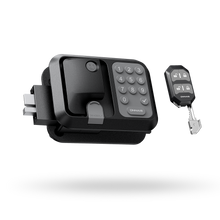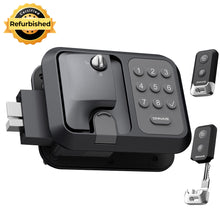
Keyless RV Door Lock Battery Checklist: Low-Battery Warnings, Spare Batteries, and Backup Entry
What a low-battery warning looks like, which AA cells a keyless RV lock needs, how to store spares, and how to get in when the batteries are dead.

A dead keyless RV door lock battery is inconvenient, but it should not lock you out permanently. The mechanical key is your first backup. This checklist shows how to spot the Guard low-battery warning, replace the four AA cells, store spares, and get back in when the batteries are dead.
1. Check Which Power Setup Your Lock Uses
A keyless RV lock isn't just one battery. You're managing two independent power systems, plus an emergency port on select models:
- Lock body batteries: Installed in the interior handle to run the motor, keypad, buzzer, and Bluetooth module.
- Remote key fob battery: Each fob has its own cell. A dead fob doesn't mean the lock batteries are dead.
- Emergency power port: An exterior port on select models for temporary power. It isn't a battery and doesn't charge the lock (see Section 6).
Power designs vary across brands, including 12V wiring, USB-C rechargeable packs, and 9V jump contacts. Our ONNAIS Guard series models all use four AA 1.5V alkaline batteries per lock (not included).
Power Specifications Across ONNAIS Guard Models
| Feature | Guard SE (W007) | Guard Pro (W007B) | Guard Smart (W008) |
|---|---|---|---|
| Lock body batteries | 4 x AA 1.5V | 4 x AA 1.5V | 4 x AA 1.5V |
| Low-battery threshold | Below 5 V | Below 5 V | Below 5 V |
| Battery change affects code or fob? | No | No | No |
| Emergency power port | Not listed in manual | Not listed in manual | Yes (emergency only; does not charge) |
| In-app battery level check | No | No | Yes |
Guard Smart is the only model that shows battery status in the app. Guard SE and Guard Pro rely on beeps and keypad lights.
2. What a Low-Battery Warning Actually Looks Like
Most guides only say a lock "alerts you when low." Here is the exact sequence to check at the door.
2.1 The Signal Sequence on ONNAIS Guard Locks
All three Guard manuals share the same low-voltage warning:
When the battery level drops below 5 V, the lock will issue a low-power alert. After unlocking (indicated by three short beeps), the buzzer will sound a long beep, and the one-touch lock button will flash red five times. At this time, please replace the battery as soon as possible.
Watch and listen for three things right after unlocking:
- Three short beeps as the lock unlocks
- One long beep immediately after
- Five red flashes on the one-touch lock button
Don't put that off. The manual says "as soon as possible" after this warning appears. The 5 V figure is the lock's battery-pack alert threshold, not a promise of a specific number of unlocks remaining.

2.2 Why a Lit Keypad Doesn't Mean You Have Enough Power
RVers often assume batteries are fine because the keypad lights up. Keypad LEDs draw only a few milliamps; the deadbolt motor needs a heavy current burst.
As alkaline cells age or get cold, internal resistance (Ri) climbs. Voltage looks normal at rest, then sags the instant the motor engages. The Energizer Alkaline Handbook explains that high drain rates in cold environments can cause a large voltage drop as battery internal resistance rises. The LEDs light, voltage drops under load, and the motor stalls.
2.3 How Other Brands Signal Low Power
Other manufacturers use different low-power signals:
- Spoken "low battery" voice prompts with flashing lights on post-2023 handles
- Rapid bursts of beeps during lock or unlock
- An amber indicator light paired with one long beep
- Smartphone app alerts
2.4 Why a Warning Might Be Muted
Our Guard locks have a MUTE button, and sliding the interior Child Lock switch to Lock disables SET, LIGHT, MUTE, and RESET. If sound was muted and Child Lock is on, you won't hear beeps and those buttons won't respond. Fold these checks into your regular RV lock maintenance routine.
3. How to Change the Batteries Without Losing Your Code
Grab a small Phillips screwdriver, four new AA alkaline batteries, and a dry cloth or clean pencil eraser.
3.1 Three Steps from the Manual
The battery cover is on the interior side of the handle, so you swap cells from inside:
- Remove the screw on the back battery cover.
- Install four new AA alkaline batteries from the same brand and package, matching the
+and-markings. - Reinstall the battery cover and tighten the screw snug.
Our manuals also advise removing batteries outside the travel season to extend battery life and prevent lock damage.

3.2 Will Changing the Batteries Wipe Your Code or Fob?
Changing the batteries will not affect the current code or remote programming.
The Guard manuals confirm this. You can put fresh batteries in before a trip without resetting your PIN or re-pairing fobs.
3.3 The Action That Does Clear Settings: Factory Reset
A battery change is not a reset. Running a factory reset (to recover a forgotten password or delete paired fobs) erases all passwords and fob data. See our ONNAIS user manuals for reset instructions.
3.4 Four Habits for Every Battery Swap
- Inspect for white crust or rust: Clean dirty contacts gently with a pencil eraser or dry cloth, per the Energizer handbook.
- Use four new cells from the same brand and package: Never mix old and new cells. All four should be new.
- Confirm polarity: Match every cell to the compartment markings.
- Test with the door open: Cycle the keypad and fob once before closing the door.
4. Which Batteries to Buy (and Why to Skip Rechargeables)
4.1 What ONNAIS Manuals Specify
Our manuals and product FAQs state the requirement clearly:
For best performance, please use four AA alkaline batteries. Try to avoid using rechargeable batteries, as they may cause unstable voltage.
Use four new AA 1.5V alkaline batteries from the same brand.
4.2 Why Rechargeable Batteries Can Cause Lockouts
It comes down to voltage and discharge curves:
- Lower voltage: Alkaline AAs supply 1.5V per cell (6.0V for four). NiMH rechargeables supply 1.2V per cell (4.8V for four), below the lock's stated 5 V warning threshold.
- Different discharge curves: Energizer describes alkaline cells as having a sloping discharge curve. NiMH cells have lower nominal voltage and often a flatter profile, so the lock's low-battery warning may not behave as expected.
4.3 What About Forum Advice on Lithium AAs?
Forum threads often suggest lithium AAs or 1.5V rechargeable lithium cells. While lithium handles cold well, it is not what our ONNAIS manuals specify. Stick with the battery type in your lock's manual rather than assuming another chemistry will trigger the same warning behavior.
4.4 Buying and Storage Specs
- Type: AA 1.5V alkaline
- Count: 4 in the lock, plus 4 spares
- Storage: Store spares dry at room temperature. The Energizer handbook gives about 3% annual capacity loss at 20°C and a recommended storage range of -40°C to 50°C. Extreme temperature cycling can weaken seals and increase leak risk.
4.5 Replacing a Corroded Rear Compartment
If leaked batteries ruin the rear tray, our RV lock rear battery compartment replacement replaces the rear compartment for W007, W007B, or W008. It does not include batteries or the front lock body. Compare the shape, dimensions, and connection points before ordering.
4.6 Disposing of Used Batteries
Some communities allow alkaline and zinc-carbon cells in household trash. Check your local recycling and household-waste rules before disposing of used batteries. The US EPA guide on used household batteries notes that lithium and rechargeable batteries need separate handling; tape terminals or bag batteries separately when your local program requires it.
5. Spare Batteries: How Many to Carry, Where to Keep Them, and How to Rotate
- Keep one 4-pack in the rig and a second 4-pack in your tow vehicle or tool bag: Spares locked inside the camper won't help until you unlock the door.
- Avoid hot gloveboxes and uninsulated outer bays: Heat and repeated freeze-thaw cycling can shorten storage life and stress battery seals. Store spares in an interior cabinet in a dry box.

- Rotate spare packs periodically: Move an older spare pack into the lock or household remotes when practical and put a fresh pack into your spare kit. Printed shelf-life numbers apply to unopened packs stored under the stated conditions, not open packs on the road.
- Separate spare batteries from spare keys: Never keep both in the same pouch; losing one bag shouldn't cost you both backups. If your current handle is worn beyond simple battery upkeep, check the signs you need to replace your RV lock.
6. Backup Entry and Remote Access
6.1 Mechanical Backup Keys: Your Non-Electronic Way In
All three Guard locks include mechanical backup keys. Keep the silicone keyhole cover closed when the key isn't in use to block water ingress.
I'd keep one mechanical key in the tow vehicle or on your everyday keyring, and give a second copy to a travel partner. Never leave your only backup key inside the RV or hidden on the exterior doorframe.
6.2 Emergency Power Port (Guard Smart W008 Only)
Our Guard Smart (W008) manual states:
This port provides temporary power to operate the RV lock when the internal batteries are dead and no key is available. This is for emergency use only and does not charge the lock.
Plug in a power bank to wake the keypad and enter your code, then unplug it and replace the four AA alkaline batteries right away. Keep the silicone cover closed afterward. Guard SE (W007) and Guard Pro (W007B) manuals do not list an emergency power port; on those models, use the mechanical key.

6.3 Remote Fobs and the Key-Code Trap
Your fob uses its own battery, separate from the four AAs in the handle. Some replacement fobs require your key code (formatted like H2025-XX-XXX), printed on the back of your original remote or inside the lock's battery compartment. Check the ONNAIS user manuals and the replacement-fob instructions for your model.
The catch: if the lock batteries are dead and your mechanical key is missing, you can't open the battery compartment to read the key code, so you can't order a matched fob. Record that code on install day.
On Guard Pro (W007B), one fob can control two Guard Pro locks (pair Lock 1 and Lock 2 to one lock, or repeat pairing on each door for two locks). Each lock pairs with up to 6 fobs; clearing fob data requires a full reset.
6.4 What Not to Do When Locked Out
Don't pry the door, drill the cylinder, or force the handle. You can damage the motor, wiring harness, or door frame. Call a locksmith or RV roadside service instead. For latch issues or replacements, see RV lock troubleshooting.
7. Cold Weather and Long-Term Storage
7.1 Why Cold Batteries Act Dead (and Why Warming Works)
Cold slows chemical reactions and ion diffusion in alkaline cells. The Energizer handbook says alkaline batteries can operate as low as -20°C (-4°F), but performance is significantly lower and internal resistance causes a steep voltage drop under motor loads.
That drop is temporary. As Energizer notes:
No capacity is actually lost due to cold temperatures; rather it is more difficult to access the full potential of the battery due to the slowing of the electrochemical reactions.
Just as a cold flashlight recovers indoors, warming a cold RV lock gently before retrying often restores enough output to open the door. Cup your hands over the keypad, wait for sun on the door, or let the cabin heater warm the inside handle. Never use a torch, open flame, heat gun, or boiling water.
7.2 Winter Trip Habits
Install four fresh AA alkaline cells before winter trips, and use your mechanical key on bitter mornings instead of draining cold batteries with repeated keypad tries.
7.3 Long-Term Storage: Remove or Keep the Batteries?
- Remove them (manual recommendation): Our manuals advise removing batteries outside the travel season to extend life and prevent temperature-cycling leaks. The lock then operates by mechanical key only.
- Leave them in: Convenient for quick visits and Guard Smart app checks, but storage aging and freeze-thaw leak risks rise.
- How to choose: If your RV sits parked for more than a season, remove the batteries and bring your key. For shorter breaks, use a fresh set only if you are comfortable checking the lock and its storage conditions.
7.4 Mechanical Winterizing
This guide covers power only; for cylinder lubrication and weather seals, use our guides to winterize RV locks and our RV storage security checklist.
8. Still Not Working After a Battery Change? A 4-Step Diagnosis
Step 1: Check the Batteries and Polarity
Confirm all four cells are new AA 1.5V alkaline batteries from the same brand and package, and match the + and - markings. If you have a multimeter, check the four cells in series (using 6 V as a rough reference).
Step 2: Check the Child Lock Switch
Check the Child Lock switch on the interior panel. In the Lock position, SET, LIGHT, MUTE, and RESET are all disabled, which makes a working lock feel unresponsive after a battery swap. Slide it to Unlock.
Step 3: Check Reset Status and Bluetooth
Changing batteries keeps your PIN and fob pairing intact, but if someone triggered a factory reset while troubleshooting, all codes and fobs were cleared and must be reprogrammed. On Guard Smart, confirm phone Bluetooth is on.
Step 4: Check Door Alignment With the Door Open
With the door open, run the deadbolt using the keypad and fob. It should extend and retract smoothly without the strike plate resisting it. If it works open but stalls when closed, inspect door sag and strike alignment. If it still stalls with the door open after a fresh battery set, treat it as a power or hardware problem and contact SUPPORT@ONNAISAFE.COM with your product name and issue details.
9. One-Page Printable RV Lock Battery Checklist

| Timing | Checklist Action |
|---|---|
| Install Day | Record the H2025-XX-XXX key code from the fob back or battery compartment in your phone, email, or a cloud document that is not stored only inside the vehicle; test both mechanical keys; log the battery install date. |
| Before Every Trip | Unlock with the keypad and listen for the low-battery alert (three short beeps + one long beep + five red flashes); pack 4 spare AA alkaline cells. |
| Quarterly | Test the mechanical key cylinder and close the silicone cover; if battery-compartment access is easy, inspect the tray for white residue or corrosion. |
| Seasonal Storage | Remove batteries if parking for more than a season; rotate spare AA packs periodically and update your install date log. |
| On Low-Power Alert | Replace all four cells that same day with fresh, matching AA 1.5V alkaline batteries; test with the door open before latching shut. |
Frequently Asked Questions
1. What batteries does a keyless RV door lock use?
Our ONNAIS Guard SE, Guard Pro, and Guard Smart locks all use four AA 1.5V alkaline batteries, which are not included in the box. Always install four new alkaline cells from the same brand and package, and avoid using rechargeable AA batteries.
2. How long do keyless RV door lock batteries last?
There is no universal lifespan. How long a set lasts depends on daily door cycles, outside temperatures, battery quality, and whether the deadbolt slides freely into the strike plate. ONNAIS does not publish a fixed month rating, so inspect your batteries quarterly and test before every trip.
3. Will I lose my code or fob pairing when I change batteries?
No. Our Guard series manuals state that changing the batteries will not affect your current keypad password or remote fob programming. Your settings are retained during a normal battery swap, though running a factory reset will erase all passwords and paired fobs.
4. What does the low-battery warning look like?
When battery pack voltage drops below 5 V on an ONNAIS Guard lock, unlocking produces three short beeps, followed right away by one long beep and five red flashes on the one-touch lock button. Replace all four AA alkaline batteries as soon as possible.
5. Can I use rechargeable AA batteries?
We advise against rechargeable batteries. Most NiMH rechargeable AAs deliver 1.2V per cell instead of 1.5V and often have a flatter discharge profile, so they may not give the lock the same warning behavior as alkaline cells.
6. What if the keypad lights up but the door won't unlock?
Keypad lights draw very little current, while the deadbolt motor requires a much heavier current draw. High internal resistance in depleted or cold batteries causes voltage to drop under motor load. Warm the lock gently in freezing weather, and replace all four AA alkaline batteries.
7. Where should I keep the spare key?
Keep your mechanical backup key outside the RV, such as in your tow vehicle, in your pocket, or with a trusted travel companion. A spare key locked inside the camper cannot help you get back in when the batteries run out.
Keep Your RV Entry Ready for the Road
Keep your mechanical keys accessible and a spare AA pack outside the locked vehicle. For model-specific maintenance instructions, see the ONNAIS user manuals. If you're considering other smart lock options or need a replacement, browse the ONNAIS RV door lock collection.